Open MeloClash on the TV
Launch the Android TV app or visit meloclash.com/tv in the browser on your big screen.
MeloClash TV
Guess songs from your favourite artists. Music on the TV, answers on your phones.
Scan the QR code and join the game.
Android TV Web Free to start
Create a room in seconds, with no console or buzzers.
Launch the Android TV app or visit meloclash.com/tv in the browser on your big screen.
Scan the displayed QR code or enter the room code from each phone. The first player chooses the music and starts the game.
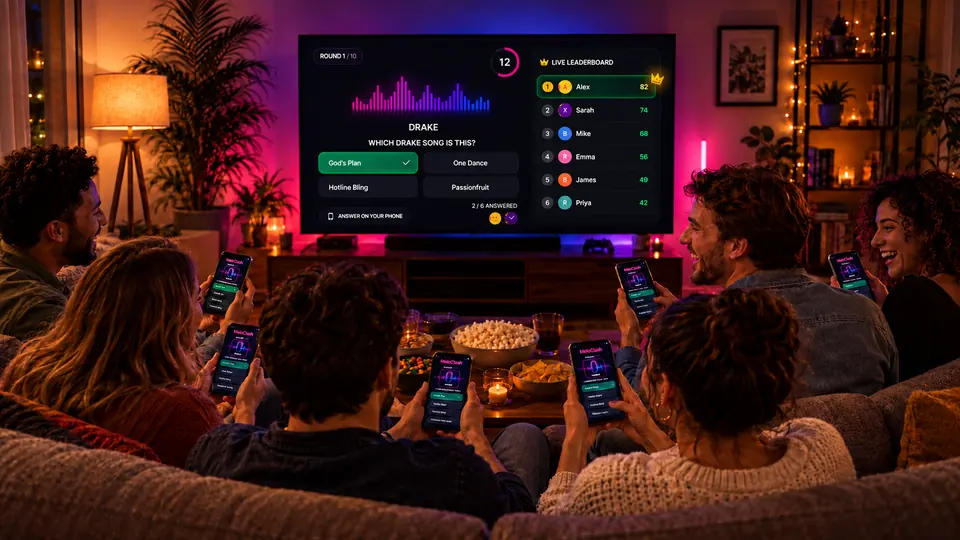
The song plays on the TV, everyone answers on their phone and scores update live.
Use the MeloClash Android TV app or open meloclash.com/tv in the browser of your Smart TV, computer or streaming device.
Search for MeloClash in your TV Play Store.
Open meloclash.com/tv on the big screen.
MeloClash brings the screen, audio, answers and leaderboard together in one shared experience.
Questions, countdowns, reveals and the podium stay visible to everyone.
Every participant answers on their own screen without installing a mobile app.
Build a music quiz that matches your party and your guests' tastes.
Correct answers, speed and rankings update after every round.
Open MeloClash on Android TV or meloclash.com/tv in your television browser. A room and QR code are created automatically so players can join from their phones.
Yes. The app is available on Android TV. On other Smart TVs, use a compatible browser or display the site from a computer connected to the television.
No. Players scan the QR code or open MeloClash in their phone browser and enter the room code.
Yes. The room creator chooses the artist or music theme before starting the game on the big screen.
You can start without an account, with up to 5 free games per day. When available, each completed rewarded ad unlocks 1 extra game, up to 50 per day. Social rewards can also add games. Premium passes give you unlimited games for their duration, with no automatic renewal.
2 to 10 players. The TV does not count as a player.